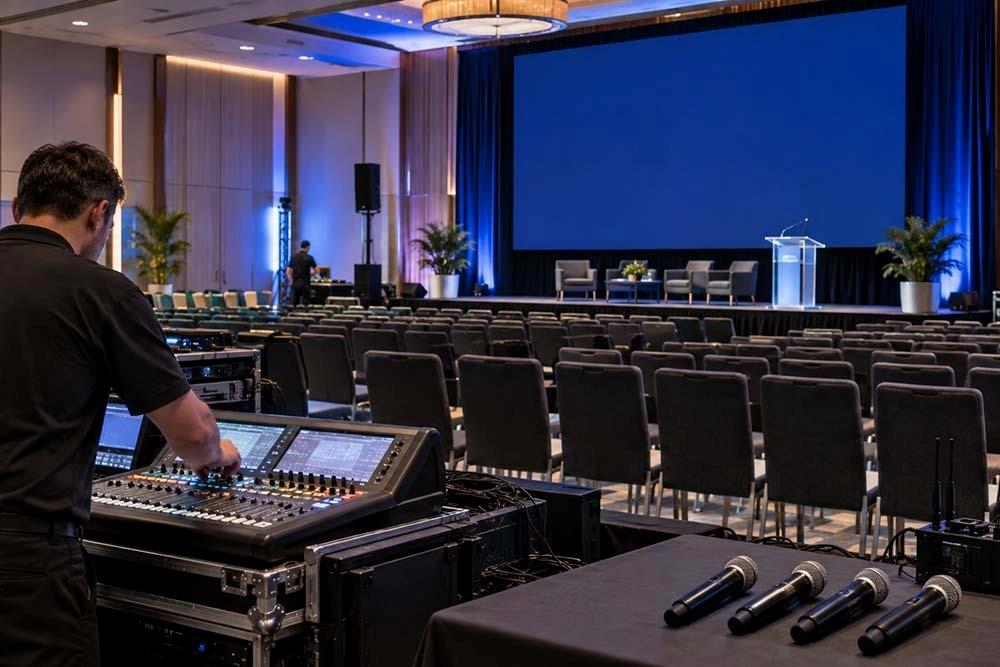
Planning a corporate event involves more than choosing a convenient location. Technology can determine whether presentations run smoothly, remote attendees stay engaged, and speakers communicate clearly. Before booking, organizers should understand what an Ontario venue supplies and what they need to arrange independently. Reviewing AV technology corporate event venue Ontario 2026 requirements early can prevent unexpected costs and technical problems.
What Should an Ontario Corporate Venue Provide?
A venue should have dependable presentation equipment, including screens or projectors, microphones, speakers, podium connections, and basic cables. Ask for a detailed equipment list rather than assuming every room includes identical technology.
For larger meetings, confirm whether the venue provides multiple displays, wireless microphones, stage lighting, and recording capabilities. When comparing AV equipment corporate event Ontario 2026 packages, check whether setup, testing, operation, and teardown are included.
Essential Technology to Bring Yourself
Some events require specialized equipment beyond standard venue packages. Organizers may bring laptops, backup computers, clickers, adapters, chargers, and backup presentation files. If speakers use different devices, provide the correct HDMI, USB-C, or other adapters.
Keep important files locally available instead of relying entirely on cloud storage. Backup cables are also useful.
Planning a Hybrid Corporate Event
Hybrid meetings require more planning because audiences participate both in the room and remotely. Effective hybrid event technology Ontario 2026 setups generally need stable internet, cameras, microphones, speakers, displays, conferencing software, and a computer capable of managing the event.
Camera placement matters. A speaker should remain visible to online attendees, while microphones should capture voices without excessive room noise. Test screen sharing, remote audio, recordings, and participant interaction before guests arrive.
For complex programs, hybrid event technology Ontario 2026 arrangements should include technical support throughout the event. A rehearsal can identify echo, delay, weak connections, incorrect camera angles, or presentation problems before they affect the session.
Building a Corporate Conference Tech Setup
A reliable corporate conference tech setup Ontario should begin with an event technology checklist. Identify every speaker, presentation, video, microphone, camera, display, and connection required. Then assign each item to the person responsible for operating it.
For multi-session conferences, label equipment. Speakers should know where to upload presentations and how early they must arrive for testing. The AV team should have presentation files before each session starts.
Internet Reliability Matters
Internet performance is critical for registrations, cloud presentations, live demonstrations, streaming, and hybrid participation. Ask the venue about dedicated bandwidth, network capacity, wired connections, and restrictions on connected devices.
For important events, request a dedicated connection where available and test it at the venue. Do not assume advertised Wi-Fi speeds represent performance during a crowded conference. A backup mobile connection can provide resilience if the primary network fails.
When selecting AV technology corporate event venue Ontario 2026 services, ask whether internet support is included and who handles troubleshooting.
Do You Need an AV Technician?
Simple meetings may operate successfully with an experienced organizer, but larger conferences, product launches, live streams, and hybrid events often benefit from a dedicated technician. A technician can manage microphones, presentations, lighting, video switching, recordings, and unexpected problems while organizers focus on guests.
Ask whether technicians are employees or separate suppliers. Confirm rates, minimum booking periods, overtime policies, and service coverage.
Final Checklist Before Booking
Before signing a venue agreement, request a written technology inventory and confirm equipment availability, internet specifications, technician support, setup times, testing opportunities, power access, and backup procedures. Compare total costs rather than looking only at room rental prices.
Good AV equipment corporate event Ontario 2026 planning also includes contingency measures. Carry duplicate presentation files, backup adapters, spare batteries, and essential contact information.
For a dependable corporate conference tech setup Ontario, prioritize compatibility, redundancy, clear responsibilities, and rehearsal time. With the right preparation, technology becomes an advantage rather than a source of stress.
FAQs
Q1: What AV equipment should a corporate event venue provide in Ontario?
A: Most professional venues should offer basic screens, projectors or displays, microphones, speakers, and presentation connections. Larger events may require additional equipment.
Q2: Do I need a dedicated AV technician for my corporate event?
A: Not always. Small meetings may need minimal support, while complex conferences, livestreams, and hybrid programs generally benefit from an experienced technician.
Q3: What technology is needed to run a hybrid event in Ontario?
A: A hybrid event typically needs reliable internet, cameras, microphones, speakers, displays, conferencing software, and a capable computer. Hybrid event technology Ontario 2026 should also include testing and backup plans.
Q4: How do I ensure reliable internet for a corporate event in Ontario?
A: Ask about dedicated bandwidth, wired access, network capacity, and backup connectivity. Test the connection before the event and confirm who handles technical support.